

In this post, we want to give an overview of binary number representation for negative numbers. We will review three different representations for negative numbers, which are fundamental when dealing with digital arithmetic and VHDL design.
To understand binary numbers, we can start recalling elementary school math.
When we first learned about numbers in the decimal system, the numbers were organized into columns (Hundreds, Tens, Ones):
H | T | O
4 | 3 | 2
So the number “432” is 4-hundreds plus 3-tens plus 2-ones.
Generally speaking a base 10 number is defined:
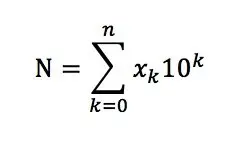
for the example above we will obtain:
432 = 4*10^2 +3*10^1+2*10^0;
In a generic base B, a number is defined by multiplying its digits by powers of B.
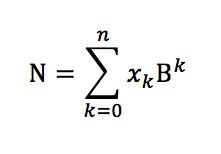
In Base 2 (Binary), the only available digits are 0 and 1.
After this brief review, let’s go to understand better the binary representation. To represent the integers from 0 to 7, it is clear that we need at least 3 digits or bits. This representation respects the formula:
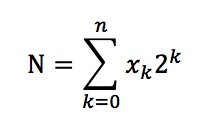
With xk= 0,1
INTEGER BINARY
     0  000
     1  001
     2  010
     3  011
     4  100
     5  101
     6  110
     7  111
The numerical operation follows the same rules of basic math learned in elementary school.
Ex:
  1    Carry
  010 + (2d)
  011 = (3d)
  101   (5d)
i.e 2+3=5
This is the binary representation for a positive number.
Representing Negative Numbers
There are three different primary solutions for binary representation of negative numbers. In all three representations, the MSB (Most Significant Bit) represents the sign bit. Let’s see them in detail using a 3-bit representation as an example.
1. Sign + Magnitude
The simplest solution is Sign + Magnitude.
For an N-Bit binary number, the N-1 bits represent the magnitude, and the N-th bit (MSB) represents the sign bit.
For example, if we have a 3-bit binary number, 010b = +2d and 110b = -2d.
| Integer | Binary |
|---|---|
| +3 | 011 |
| +2 | 010 |
| +1 | 001 |
| +0 | 000 |
| -0 | 100 |
| -1 | 101 |
| -2 | 110 |
| -3 | 111 |
Clearly, this representation has two different values for zero: positive zero (000) and negative zero (100).
2. 1’s Complement
The 1’s complement negative representation is simply obtained by flipping the bits (bit complement) of the corresponding positive value.
a_1c <= not a;

  010b = +2d  => negative: not(010) =
  101b = -2d
| Integer | Binary |
|---|---|
| +3 | 011 |
| +2 | 010 |
| +1 | 001 |
| +0 | 000 |
| -0 | 111 |
| -1 | 110 |
| -2 | 101 |
| -3 | 100 |
Even in this case, the zero value suffers from a double representation: “000” and “111”.
3. 2’s Complement
The 2’s complement representation resolves the problem of the zero value.
A negative value in 2’s complement representation is calculated as: (2^N) – v, where v is the positive value we want to convert. For example, -2d will be converted into: 2^3 – 2 = 8 – 2 = 6d = 110b.
| Integer | Binary |
|---|---|
| +3 | 011 |
| +2 | 010 |
| +1 | 001 |
| +0 | 000 |
| -1 | 111 |
| -2 | 110 |
| -3 | 101 |
| -4 | 100 |
In this case the numerical representation is unbalanced. The negative values contain one more value than the positive values, but the zero has only one representation.
Use the interactive explorer below to toggle the bits and see how the same binary string is interpreted completely differently depending on the representation system chosen.
Two zeros (+0, -0).
Two zeros (+0, -0).
One zero, unbalanced range.
As you can observe from the tool, the 2’s complement representation simplifies all the numerical operations in binary arithmetic, in fact if we need to perform the subtraction:
A-B
We need to perform
A+(-B)
Example:
  3-1 = 3+(-1)

   11   carry
   011 + ( 3d)
   111 = (-1d)
   010
Of course we have the same result with 5-bit representation:
  1111 carry
  00011 + (3d)
  11111 = (-1d)
  00010
As a rule of thumb, in 2’s complement representation, the number zero is always represented with all bit set to “0”, the number “-1” is represented with all bit set to “1”. In 2’s complement, using N bits, we can represent the following range: –2^(N-1) .. 2^(N-1)-1 For example:
N=8 => -2^7 ... 2^7-1 = -128 .. +127
N=3 => -2^2 ... +2^2-1 = -8 ... +7
Arithmetic Operation Review & Bit Growth
We will always use the 2’s complement representation in digital arithmetic. Every time we perform an arithmetic operation we need to know if the operands are signed or unsigned, i.e. if the MSB shall be interpreted as the sign bit.
In case of signed operation, if the operands are represented with a different number of bits, we need to handle the sign bit with care.
The number of bits of the result of a binary arithmetic operation can be different from the number of bits of the input operand and depends on the operation.
In the following section, we will see few examples for addition, subtraction and multiplication. As a general rule, if we have two numbers A of N-Bits, B of M-Bits the bit increment for the arithmetic operation result will be:
- ADD/SUB: max(N,M) + 1
- MULT: N + M
You can use the calculator below to quickly determine the required output width for your designs.
ADD/SUB
C=A+B;
with A and B of N bit the number of bits of C can be up to (N+1)
Example unsigned:
A=3; B=2; N=2 unsigned
   1 carry
   11 + (3d)
   10 = (2d)
  101   (1d)
The result should be C = 5; result width is N+1=3 bits wide. If we don’t handle the carry the result “wrap around”.
Pay attention for signed result:
Example signed:
A=3; B=2; N=3 signed
  1   carry
  011 + (+3d)
  010 = (+2d)
  101   (-3d)
The result should be C = 5; result is N+1=4 bits wide. If we don’t handle the carry the result “wrap around” and becomes negative.
Interact with the binary adder below. Try adding different numbers and watch how the carry propagates. Switch the operation to Subtraction to see the borrows, and see what happens when the result requires an extra bit that doesn’t fit in the current N size.
Click on the bits of operands A and B to toggle them and observe how the carries propagate.
MULT
C=A*B;
with A of N bit and B of M bit the number of bits of C will be (N+M).
The multiplication algorithm is the well-known shift and add:
Example unsigned:
A=3 (2 bit unsigned); B=7 (3 bit unsigned);
    111 x (+7d)
     11 = (+3d)
    111  +
   111-  =
  10101
C=21d is represented with 5 bit = 3+2
A=5 (3 bit unsigned); B=2 (2 bit unsigned);
   101 x (+5d)
    10 = (+2d)
   000 +
  101- =
  1010   (+10d)
Pay attention on signed multiplication:
A=-2 (4 bit signed); B=5 (4 bit signed);
     1110 x (-2d)
    0101 = (+5d)
   11110 +   (sign extension)
   0000- +   (sign extension)
 11110-- =  (sign extension)
 1110110   (-10d)
VHDL Sign Extension
The sign extension rule for 2’s complement representation can be summarized as follows:
- If the number is unsigned, no sign extension is required.
- If the number is signed, the sign extension is implemented by propagating the sign bit toward the MSB.
Example:
N bits 3;
-3d = 101
Sign extension to N-bit = 6: -3d = 111101
In VHDL, the simplest way to perform a sign extension is to use the “resize” function provided by the numeric_std library. The “resize” function tells the simulator/synthesizer to extend the sign, and it is performed in the best way for the target technology.
1. Native Resize Function (Best Practice)
library ieee;
use ieee.std_logic_1164.all;
use ieee.numeric_std.all;

entity resize_example is
  generic(
    N : integer := 8;
    M : integer := 10
  );
  port (
    i_val : in  signed(N-1 downto 0);
    o_val : out signed(M-1 downto 0)
  );
end resize_example;

architecture rtl of resize_example is
begin
  o_val <= resize(i_val, M);
end rtl;
2. Resize with Type Casting
The second example is equivalent to the first one. The type casting informs the synthesizer that we need to perform a sign extension on signal “i_val“.
architecture rtl of resize_example is
begin
  o_val <= std_logic_vector(resize(signed(i_val), M));
end rtl;
3. Manual Concatenation (Less Portable)
Another way to implement sign extension:
architecture rtl of resize_example is
begin
  o_val <= i_val(8) & i_val(8) & i_val;
end rtl;
As a rule of thumb, you should always use the predefined functions before trying to reinvent the wheel writing your custom code. The predefined functions, when available, always guarantee the best hardware implementation and your VHDL code will be technology independent.
Test Your Skills
Ready to put your knowledge to the test?
We have prepared a quick interactive challenge. The widget below will randomly generate binary addition and subtraction problems. Pay close attention to whether the operation is Signed or Unsigned, and calculate the correct decimal result.
If you find this article useful, please share the link with your friends.