
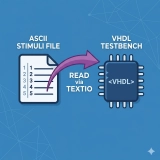
Why Read Testbench Stimuli from an Input File?
When you need to simulate a design in VHDL, it is very useful to read the stimuli provided to your Design Under Test (DUT) directly from an input file. This approach allows you to use different testbench input stimuli with the same VHDL testbench code.
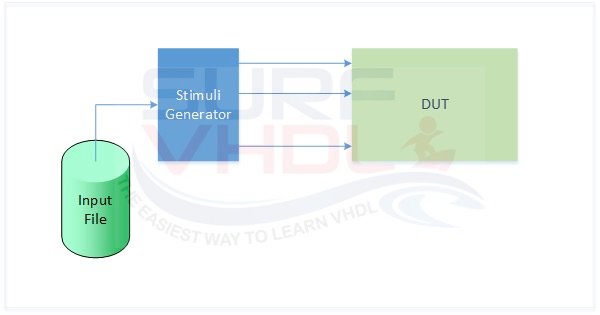
In VHDL, predefined libraries allow the user to read from an input ASCII file. The TextIO library is the standard library that provides all the procedures to read from or write to a file.
These procedures cannot be used in synthesizable RTL VHDL code—since no file handling capability is present in a silicon device—but they are extremely useful in testbench design.
VHDL Syntax: How readline and read Work
There are several different ways to open a file and read from it. In VHDL, files are handled as arrays of lines. An example of VHDL syntax to read from a file is:
-- Declare and Open file in read mode:

file file_handler     : text open read_mode is “filename.dat”;
Variable row          : line;
Variable v_data_read  : integer;

-- in the concurrent or sequential section of the architecture

-- Read line from file
readline(file_handler, row);

-- Read value from line
read(row, v_data_read);
It is important to understand the difference between the two main procedures:
– readline reads an entire line from the input file and stores it into a temporary buffer (the line variable).
– read extracts the desired value from that buffer line.
If v_data_read is an integer, the read procedure will try to extract an integer value from the input line; if it is a real value, the procedure will read a real number, and so on. A very useful feature of the read procedure is that it automatically ignores white spaces (spaces or tabs) between values in the file.
In this VHDL snippet, the file is opened during the file declaration on line 3.
Interactive TextIO Flow
Click "Step" to simulate the VHDL process.
Complete VHDL Process Example
A complete example of a process that reads two integer values from a file is given below:
library ieee;
use ieee.std_logic_1164.all;
use ieee.numeric_std.all;
use std.textio.all;
.
.
.
.
p_read : process(rstb,clk)
--------------------------------------------------------------------------------------------------
constant NUM_COL                : integer := 2;   -- number of column of file

type t_integer_array           is array(integer range <> )  of integer;
file test_vector                : text open read_mode is "file_name.txt";
variable row                    : line;
variable v_data_read            : t_integer_array(1 to NUM_COL);
variable v_data_row_counter     : integer := 0;


begin


  if(rstb='0') then

    v_data_row_counter     := 0;
    v_data_read            := (others=> -1);

    i_op1                  <= (others=>'0');
    i_op2                  <= (others=>'0');
  ------------------------------------
  elsif(rising_edge(clk)) then

    if(ena = '1') then  -- external enable signal

    -- read from input file in "row" variable
      if(not endfile(test_vector)) then
        v_data_row_counter := v_data_row_counter + 1;
        readline(test_vector,row);
      end if;

    -- read integer number from "row" variable in integer array
      for kk in 1 to NUM_COL loop
        read(row,v_data_read(kk));
      end loop;

      value1_std_logic_8_bit    <= conv_std_logic_vector(v_data_read(1),8);
      value2_std_logic_8_bit    <= conv_std_logic_vector(v_data_read(2),8);

    end if;

  end if;
end process p_read;
The code above implements a process that, at each clock cycle, reads 2 integer values from an input file if the control signal ena is '1'.
Notice the use of the endfile() function. It checks if the end of the file has been reached, preventing the simulator from crashing when trying to read beyond the available data.
This VHDL code is parametric; the number of columns in the file is configured using the constant NUM_COL. You can use this code to read the stimuli for your testbench from an input file.
The input file will have the following format:
1 2
3 4
5 6
...
TextIO Library READ Function Overloads
Below are the procedures available in the IEEE TextIO standard library to read different types of values from a file:
-- changed for vhdl92 syntax (and now a built-in):
  procedure READLINE(file f: TEXT; L: out LINE);

  procedure READ(L:inout LINE; VALUE: out bit; GOOD : out BOOLEAN);
  procedure READ(L:inout LINE; VALUE: out bit);

  procedure READ(L:inout LINE; VALUE: out bit_vector; GOOD : out BOOLEAN);
  procedure READ(L:inout LINE; VALUE: out bit_vector);

  procedure READ(L:inout LINE; VALUE: out BOOLEAN; GOOD : out BOOLEAN);
  procedure READ(L:inout LINE; VALUE: out BOOLEAN);

  procedure READ(L:inout LINE; VALUE: out character; GOOD : out BOOLEAN);
  procedure READ(L:inout LINE; VALUE: out character);

  procedure READ(L:inout LINE; VALUE: out integer; GOOD : out BOOLEAN);
  procedure READ(L:inout LINE; VALUE: out integer);

  procedure READ(L:inout LINE; VALUE: out real; GOOD : out BOOLEAN);
  procedure READ(L:inout LINE; VALUE: out real);

  procedure READ(L:inout LINE; VALUE: out string; GOOD : out BOOLEAN);
  procedure READ(L:inout LINE; VALUE: out string);

  procedure READ(L:inout LINE; VALUE: out time; GOOD : out BOOLEAN);
  procedure READ(L:inout LINE; VALUE: out time);

  procedure SREAD (L    : inout LINE; VALUE : out STRING; STRLEN : out NATURAL);
  alias STRING_READ is SREAD [LINE, STRING, NATURAL];
  alias BREAD is READ [LINE, BIT_VECTOR, BOOLEAN];
  alias BREAD is READ [LINE, BIT_VECTOR];
  alias BINARY_READ is READ [LINE, BIT_VECTOR, BOOLEAN];
  alias BINARY_READ is READ [LINE, BIT_VECTOR];

  procedure OREAD (L    : inout LINE; VALUE : out BIT_VECTOR; GOOD : out BOOLEAN);

  procedure OREAD (L    : inout LINE; VALUE : out BIT_VECTOR);
  alias OCTAL_READ is OREAD [LINE, BIT_VECTOR, BOOLEAN];
  alias OCTAL_READ is OREAD [LINE, BIT_VECTOR];

  procedure HREAD (L    : inout LINE; VALUE : out BIT_VECTOR; GOOD : out BOOLEAN);

  procedure HREAD (L    : inout LINE; VALUE : out BIT_VECTOR);
  alias HEX_READ is HREAD [LINE, BIT_VECTOR, BOOLEAN];
  alias HEX_READ is HREAD [LINE, BIT_VECTOR];
If you appreciated this post, please help us share it with your friends.